

























Keychain:Best auto dealer website template for independent car dealers
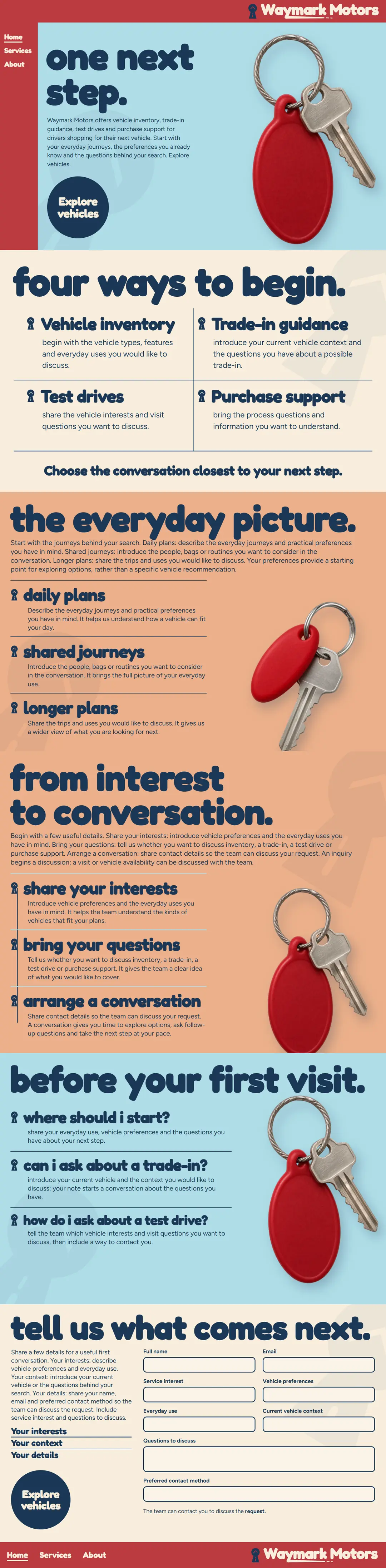
Keychain is built around one red key fob on sky blue, the moment a buyer gets the keys, with round Fredoka headings and a cherry rail down the side. It suits an independent car dealer with a friendly, personal brand, and the home page moves from the four service areas to everyday plans, three steps and short questions.
An auto dealer website with a set of keys. A red key fob hangs beside each section on sky blue and apricot, round lowercase Fredoka headings carry the page, and a cherry rail and a round navy button lead to the form.
- Pages
- Home, Services, About, 22 sections in all
- Editable fields
- 178 in HubSpot and WordPress
- Typefaces
- Fredoka Light, Figtree Light
- Image files
- 3
- Downloads
- Astro 956 KB, HubSpot 4.9 MB, WordPress 1.3 MB
- Look
- Dark and light sections
- Collections
- Auto dealer
- Framer
- Coming soon
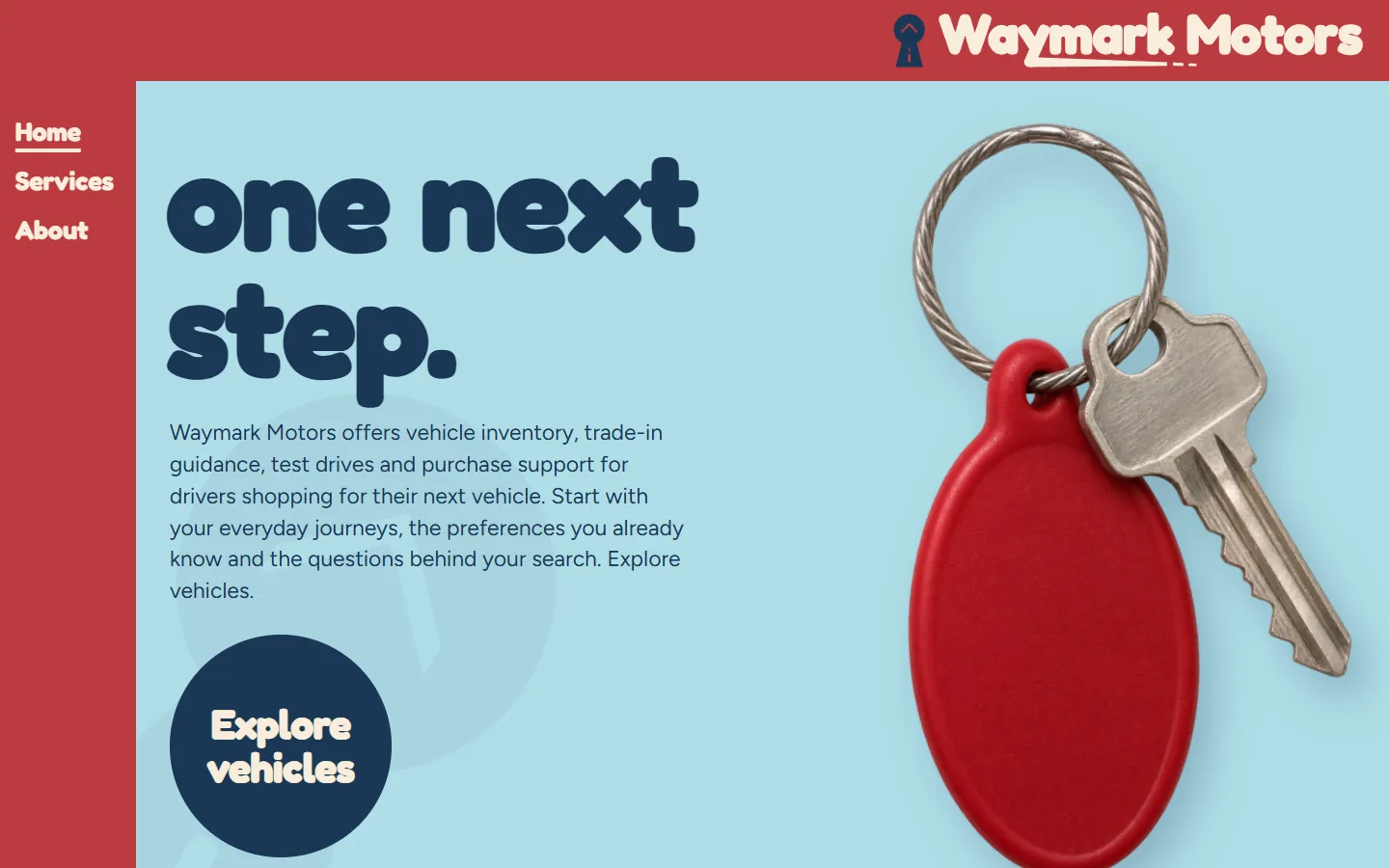
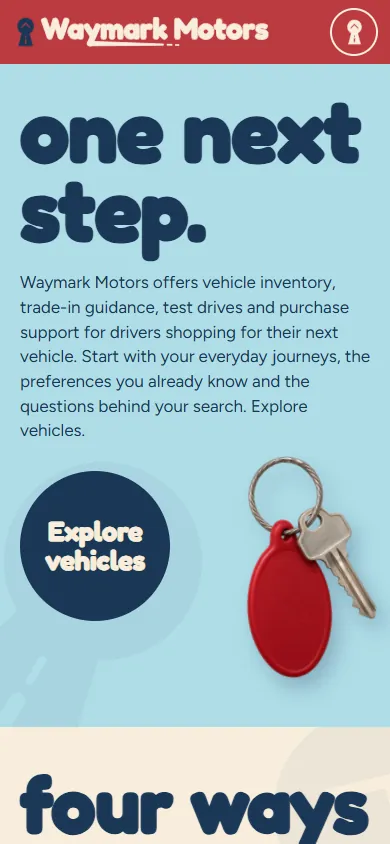
Screenshots of the live demo at 1440 and 390 pixels. The content is placeholder: Waymark Motors, a fictional dealership for drivers shopping for their next vehicle that discusses vehicle inventory, trade-in guidance, test drives and purchase support.
Download Keychain
Free: a short form (first name and work email) once, then every zip downloads straight away. Free to use and adapt for personal and commercial sites. Each zip holds one folder, keychain-auto-dealer, with a README; the install steps below are condensed from it.
An Astro project: one page file each for Home, Services and About, one component per section, the CSS, scripts, fonts and images in public/.
Needs Node 22.12 or newer.
- Unzip keychain-auto-dealer-astro.zip; it holds one folder, keychain-auto-dealer.
- In that folder run npm install (Node 22.12 or newer).
- Run npm run dev and open http://localhost:4321; the pages are /, /services/ and /about/.
- Edit the copy in src/components (one file per section), the colors and type in public/css, and the images in public/images.
- Run npm run build; the static site is written to dist/.
More from the Astro README
What is where
- src/pages: one file per page (index, services, about), with its head and its sections in order.
- src/components: one file per section; the skip link and the footer are shared by the three pages.
- public/css and public/js: the stylesheets and scripts. public/fonts: the typefaces, open source (see LICENSE.md). public/images: the pictures and the logo.
- CLAUDE.md and AGENTS.md: notes that tell Claude Code or Codex how the project is organized.
Make it yours
- Repeated items (cards, steps, questions) share the same markup: copy one to add another.
- Each page has its own header and footer, because each marks its own page as current in the menu. Change all three when you change one.
- Remove a section by deleting its tag and its import in the page file.
- Set the title and meta description of each page. The forms check their fields and send nothing: connect them to your form service.
How it was checked
- Built with astro build and compared with the static site page by page at desktop and phone widths, with the links between the three pages checked.
A HubSpot CMS theme: Home, Services and About templates plus a Page template, one module per section, each with its own fields.
Needs a free HubSpot account and Node.js 20 or newer for the HubSpot CLI.
- Install the HubSpot CLI: npm install -g @hubspot/cli (Node.js 20 or newer), then run hs account auth.
- Unzip keychain-auto-dealer-hubspot.zip, then from the folder that holds keychain-auto-dealer run hs cms upload keychain-auto-dealer keychain-auto-dealer.
- In HubSpot go to Content > Website Pages > Create > Website page and set Keychain Auto Dealer as the active theme.
- Create three pages from the templates Keychain Auto Dealer - Home (at /), Keychain Auto Dealer - Services (at /services) and Keychain Auto Dealer - About (at /about).
- Give each page its title and meta description in Settings, then publish.
More from the HubSpot README
Change the content
- Each section is a module with its own fields, 178 in all. Click a section in the page editor and its fields open on the left, grouped by item.
- The sections in the page body sit in a drag and drop area: move, remove or add them, and add HubSpot modules such as forms between them.
- Images: an empty image field shows the template's own picture. Links: /services, /about and / are the pages of the site; #faq jumps within a page.
- The forms are demonstrations. Swap one for a HubSpot form module to collect answers.
What is in the theme
- templates/home.html, services.html and about.html, plus page.html for any other page with the same header and footer.
- modules/<name>.module: one per section, its markup and its fields. css, js, fonts and images: the site's own files.
- HubSpot takes no WebP in a theme, so the images are PNG and JPEG copies.
How it was checked
- Converted from the static site by the same script as every template here, with every module and its fields generated from the page.
- Not checked yet: uploading to a HubSpot account and HubSpot's own preview, the page editor and publishing.
A WordPress block theme: Home, Services and About with one block per section, plus page, post, blog and 404 templates.
Needs WordPress 6.6 or newer and PHP 7.4 or newer.
- In WordPress go to Appearance > Themes > Add New Theme > Upload Theme.
- Choose keychain-auto-dealer-wordpress.zip, then Install Now and Activate.
- The homepage shows the template, and activating the theme creates the Services (/services/) and About (/about/) pages if they do not exist yet.
- Edit each page in Appearance > Editor > Templates: Front Page, Page: services or Page: about. Click a section, change its fields in the Block tab, then Save.
More from the WordPress README
Change the content
- Each section is a block with its own fields, 178 in all, listed in the Block tab and grouped by item. The page updates as you type.
- Header and footer: each page has its own, because each marks its own page as current in the menu. Change all three.
- Empty a field to remove its element; clear every field of a card and the card goes. Move sections with the arrows in the toolbar, or add one back from the block inserter.
- The forms are demonstrations: connect them to a form plugin or service before going live.
What the fields do not cover
- More items than the template has needs an edit in sections/<name>.php (markup) and inc/sections.php (fields).
- Icons and drawings are inline SVG; colors, fonts and spacing are in the stylesheets in css/.
- The theme prints each page title and description; an SEO plugin takes over the description when active. Functions and blocks are prefixed keychain_auto_dealer_ and keychain-auto-dealer/.
How it was checked
- Installed from the zip in WordPress Playground on WordPress 7.1.4 with PHP 8.3: the theme activates, creates the Services and About pages, and each page matches the static version at 1440 and 390 pixels.
- Not checked: a real hosting account, browsers other than Chromium, other plugins and multisite.
Framer
Framer version coming soon. It will be listed here next to the other three downloads.
The three pages of Keychain and their sections
In page order. In HubSpot each section is a module and in WordPress a block, 178 fields in all; in Astro each is one component file. The live demo has all three pages: use the links in its header.
Home · 10 sections
Home page
- HeaderWordmark and the Home, Services and About links · 1 fields
- one next stepHeading, text and links · 11 fields
- four ways to beginVehicle inventory, Trade-in guidance, Test drives, Purchase support · 10 fields
- the everyday picturedaily plans, shared journeys, longer plans · 8 fields
- from interest to conversationshare your interests, bring your questions, arrange a conversation · 8 fields
- before your first visitwhere should i start?, can i ask about a trade-in?, how do i ask about a test drive? · 7 fields
- tell us what comes nextHeading, text and links · 15 fields
- FooterWordmark, page links and the closing line · 7 fields
- Phone menuThe menu that opens from the header on phones · 8 fields
- Request buttonA button that opens or links to the request form · 2 fields
Services · 7 sections
Services page
- HeaderWordmark and the Home, Services and About links · 1 fields
- vehicle inventorytrade-in guidance. · 19 fields
- test drivesHeading, text and links · 6 fields
- purchase supportHeading, text and links · 9 fields
- FooterWordmark, page links and the closing line · 7 fields
- Phone menuThe menu that opens from the header on phones · 8 fields
- Request buttonA button that opens or links to the request form · 2 fields
About · 7 sections
About page
- HeaderWordmark and the Home, Services and About links · 1 fields
- room for the next chapterstart with the questions. · 15 fields
- a vehicle search is personalHeading, text and links · 4 fields
- begin with your plansHeading, text and links · 12 fields
- FooterWordmark, page links and the closing line · 7 fields
- Phone menuThe menu that opens from the header on phones · 8 fields
- Request buttonA button that opens or links to the request form · 2 fields
Design notes
A cherry rail runs down the left with the Home, Services and About links, and the first screen is sky blue with "one next step." in heavy round lowercase type, a short intro, a round navy "Explore vehicles" button and the red key fob on the right.
Below come "four ways to begin." with a small key mark for each service area, "the everyday picture." on apricot with daily plans, shared journeys and longer plans, "from interest to conversation." with three steps and "before your first visit." on sky with three questions that open and close.
The form closes the page under "tell us what comes next.", in three labeled steps, and the About page has one of its own.
Shape and spacing
A round navy button, a full-height cherry rail on desktop, small key marks beside each heading and cut-out photos of the fob.
Images
3 photos as WebP: the red key fob and keys upright, tilted and wide.
Typefaces
- Fredoka LightRound lowercase headings
- Figtree LightBody copy, navigation and the form
Open source, included as WOFF2 files in the fonts folder (see LICENSE.md in each zip).
Colors
- Cherry
#BB3A40Rail, header and the key fob - Sky
#AFDDE7Hero and question bands - Navy
#1B3756Headings and the round button - Apricot
#ECB08AThe everyday band - Paper
#FBF4E8Page background and the form
What works on the page
- On phones the rail becomes a cherry top bar with a menu button, and a round "Explore vehicles" button stays on screen.
- The three questions under "before your first visit." open and close.
- The About page has its own form.
- Sections ease in as they scroll into view; the motion turns off under reduced-motion settings.
- The form checks its fields in the browser and confirms on the page. It sends nothing until you connect it.
Who Keychain fits
An independent dealer with a friendly, personal brand.
A dealer who wants one simple, memorable image.
Anyone without lot photos yet: the key fob carries the page.
A brand in red and blue.
See the whole page as one image (1080 by 4387 pixels, 298 KB)
Questions about Keychain
Can I use photos of my cars instead of the keys?
Yes. Each image is a file, so swap it with the same file name, or keep the fob in the first screen and add car photos further down.
Is the round font easy to read?
Fredoka is used only for headings at large sizes. The body copy and the form are Figtree, a plain sans serif.
What does the form ask?
Name, email, the service interest, vehicle preferences, everyday use, the current vehicle, questions and the preferred contact method. It sends nothing until you connect it.
Is Waymark Motors real?
No. The dealership and its details are placeholders. Free to use and adapt for personal and commercial sites.
More auto dealer templates like Keychain
Same content, different designs. Keychain is listed in Auto dealer website templates. Or browse the full gallery.

Start with one process.
We learn the business and build your first go-to-market process on us this month.
Template
growigami.com